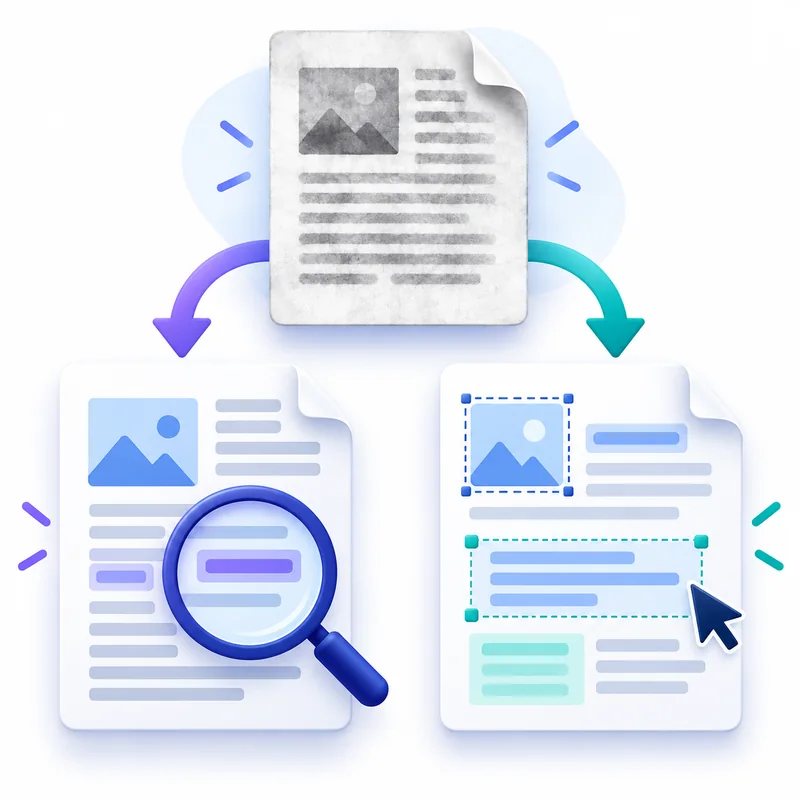
Compare OCR PDF with PDF to Word so you can choose searchable fixed pages or a flowing DOCX you can rewrite and reformat.
- Searchable and editable describe different outcomes: A searchable PDF keeps a fixed page and adds characters that a viewer can find, select and copy.
- OCR answers the question: what do these pixels say?: Image-only pages have no dependable sequence of characters.
- Word conversion rebuilds structure and introduces reflow: PDF stores where visible items sit on a page.
Use these checks before completing Searchable PDF vs Editable Word: Which Do You Need?.
Searchable and editable describe different outcomes
A searchable PDF keeps a fixed page and adds characters that a viewer can find, select and copy. An editable Word document rebuilds the content as paragraphs, headings, lists, tables and images that can reflow when margins, fonts or wording change.
Choose OCR PDF when the scan's appearance must remain the reference. Choose PDF to Word when the document must become a DOCX for rewriting. Both can use recognition, but they package the recognized content for different jobs.
OCR answers the question: what do these pixels say?
Image-only pages have no dependable sequence of characters. OCR first identifies regions that resemble printed words, predicts those characters and places them in a reading layer. That layer enables search without reconstructing the page as a normal document.
The earlier guide to what free OCR does to a scan explains the plan limits and badge. The practical decision here comes afterward: preserve the recognized scan as a searchable PDF, or transform the recognized words into a document designed for editing.
Word conversion rebuilds structure and introduces reflow
PDF stores where visible items sit on a page. Word stores a flowing document model. Conversion must infer paragraph boundaries, column order, heading levels, image placement and table cells, which is why a complex brochure may not look identical after conversion even when its words are correct.
Standard PDF to Word conversion is free and includes automatic OCR for scanned pages. Free accounts support up to 50 MB and 300 pages, while Premium supports up to 100 MB and 600 pages. For a Writer-compatible open format, PDF to ODT applies the same text-document intent instead of creating DOCX.
Use the smallest transformation that completes the task
If you only need Ctrl+F, copying or document indexing, converting to Word adds unnecessary layout interpretation. OCR the PDF and keep its fixed pages. If you must correct clauses, replace names, translate paragraphs or reuse the content, a searchable layer alone is not enough, so choose an editable output.
For plain extraction without page appearance or editing structure, compare PDF to Text versus PDF to Word. A TXT result is useful for raw words, while DOCX is useful when headings, lists, tables and images need to remain part of the working document.
Verify the result according to its purpose
Test a searchable PDF by finding representative terms and copying a sentence from several pages. Test an editable DOCX by checking reading order, paragraph breaks, table boundaries, image placement and whether critical fonts were substituted.
Recognition quality still begins with the scan. In both outputs, review material numbers and names against the page image. A correct-looking layout is not proof that every recognized character is accurate, and a perfectly recognized paragraph does not guarantee that a multi-column reading order was rebuilt correctly.
Decision table for Searchable PDF vs Editable Word: Which Do You Need?
| Checkpoint | What to verify |
|---|---|
| Searchable and editable describe different outcomes | A searchable PDF keeps a fixed page and adds characters that a viewer can find, select and copy. |
| OCR answers the question: what do these pixels say? | Image-only pages have no dependable sequence of characters. |
| Word conversion rebuilds structure and introduces reflow | PDF stores where visible items sit on a page. |
| Use the smallest transformation that completes the task | If you only need Ctrl+F, copying or document indexing, converting to Word adds unnecessary layout interpretation. |
Choose between searchability and editability
- Decide whether the visible page must remain the authoritative appearance.
- Use OCR PDF for search and selection without page reflow.
- Use PDF to Word when paragraphs, tables or headings must be changed.
- Check recognition and layout against the original before using the result.
Workflow graph for Searchable PDF vs Editable Word: Which Do You Need?
Review form for Searchable PDF vs Editable Word: Which Do You Need?
Questions about Searchable PDF vs Editable Word: Which Do You Need?
Can an OCR PDF still be edited?
It can be annotated or processed by a PDF editor, but OCR does not rebuild it as a flowing word-processing document.
Does PDF to Word run OCR on scans?
Yes. Standard conversion detects image-only pages and includes OCR without a separate paid OCR step.
Which format is better for archiving?
A searchable PDF is usually the clearer archival derivative because it keeps the visible scan. Keep the original source as well when records matter.
 Continue with Google